Traveling on Horseback
Horse riding is now available to help you get around the world faster. Use your reins to mount and travel outdoors at three times your speed on foot. Your character moves with the horse’s stride, and both horse and rider turn together when changing direction.
The First Time on Horseback
The original horse mesh and animations came from Horse by MAXDESIGN-3D on Sketchfab, licensed under CC BY 4.0. We adjusted the scale for the game and split the animations into separate action clips. Codex Astra did a great job splitting the animations into individual actions.
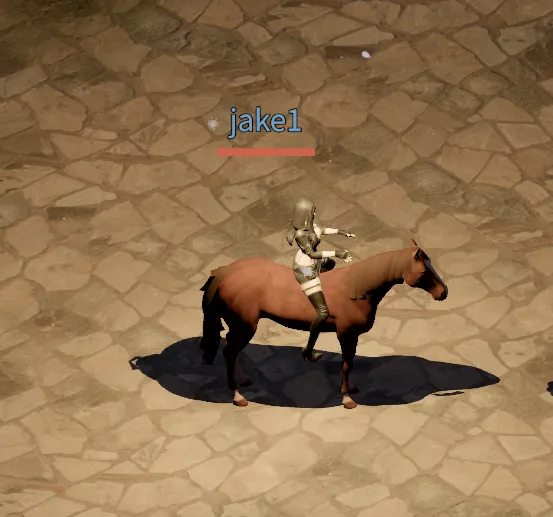
The screenshot below shows the first time the character was placed on the horse’s back. At this stage, the reins connecting the hands to the horse’s mouth had not been added, and the character animation had not yet been adjusted to match the horse’s running motion.
Mounting and Dismounting
You can purchase Horse Reins from Rica for a base price of 1 gold and 50 silver. Use them from your bag to mount, then use them again to dismount. The reins are not consumed, so one purchase lets you use them repeatedly.
You can mount on outdoor ground while out of combat. Riding is unavailable inside buildings, in dungeons, or in deep water. Entering combat or any of these places while mounted automatically dismounts you. You also start on foot when reconnecting.
Faster Travel and Smoother Turns
Riding triples your movement speed compared with traveling on foot under the same conditions. Horses use the existing pathfinding and collision rules, so fences and walls still block your path.
For large direction changes, the horse follows a small arc to face the new heading. It moves slowly during the turn, then regains speed as it lines up. This works with both click movement and keyboard controls, and you can choose a new direction before a turn finishes.
Rider Motion That Follows the Horse
This character originally had no horse riding animations. Codex Astra created all of the riding poses and motions: spreading the legs to sit astride the horse, raising the hands to hold the reins, and bobbing the body up and down in time with the horse’s movement.
Seeing Codex write code and use the same tools as humans to create animations, build 3D models, compose music, and draw pictures made me personally wonder whether we might already have reached AGI.
The horse has animations for standing idle, walking, running, and turning left or right. Movement speed determines the animation and its playback speed, with smooth transitions when starting and stopping.
Your character’s hips and upper body move with the horse’s stride. Pose adjustments keep the head and feet from bouncing excessively, while the hands lower into a relaxed position when standing still. During turns, the upper body and both hands smoothly follow the direction of the horse’s head.
Two reins connect the rider’s hands to the horse’s mouth. They follow the hands and head as they move, keeping a slight sag in the middle. Held weapons, shields, and torches are hidden while riding and reappear when you dismount.
The video below shows the next step after first placing the character on the horse’s back. Reins now connect the hands to the horse’s mouth, and the rider animation has been adjusted so the character bobs up and down in time with the horse’s movement.
Choosing a Destination on the World Map
Automatic travel from the world map is also available for longer journeys. While outdoors, press the destination button on the world map, then select a point to travel there automatically. Set a destination while mounted to make traveling across large areas more convenient.